
345 lines
16 KiB
Markdown
345 lines
16 KiB
Markdown
# FileRise
|
||
|
||
[](https://github.com/error311/FileRise)
|
||
[](https://hub.docker.com/r/error311/filerise-docker)
|
||
[](https://github.com/error311/filerise-docker/actions/workflows/main.yml)
|
||
[](https://github.com/error311/FileRise/actions/workflows/ci.yml)
|
||
[](https://demo.filerise.net) **demo / demo**
|
||
[](https://github.com/error311/FileRise/releases)
|
||
[](LICENSE)
|
||
|
||
**Quick links:** [Demo](#live-demo) • [Install](#installation--setup) • [Docker](#1-running-with-docker-recommended) • [Unraid](#unraid) • [WebDAV](#quick-start-mount-via-webdav) • [FAQ](#faq--troubleshooting)
|
||
|
||
**Elevate your File Management** – A modern, self-hosted web file manager.
|
||
Upload, organize, and share files or folders through a sleek web interface. **FileRise** is lightweight yet powerful: think of it as your personal cloud drive that you control. With drag-and-drop uploads, in-browser editing, secure user logins (with SSO and 2FA support), and one-click sharing, **FileRise** makes file management on your server a breeze.
|
||
|
||
> ⚠️ **Security fix in v1.5.0** — ACL hardening. If you’re on ≤1.4.x, please upgrade.
|
||
|
||
**4/3/2025 Video demo:**
|
||
|
||
<https://github.com/user-attachments/assets/221f6a53-85f5-48d4-9abe-89445e0af90e>
|
||
|
||
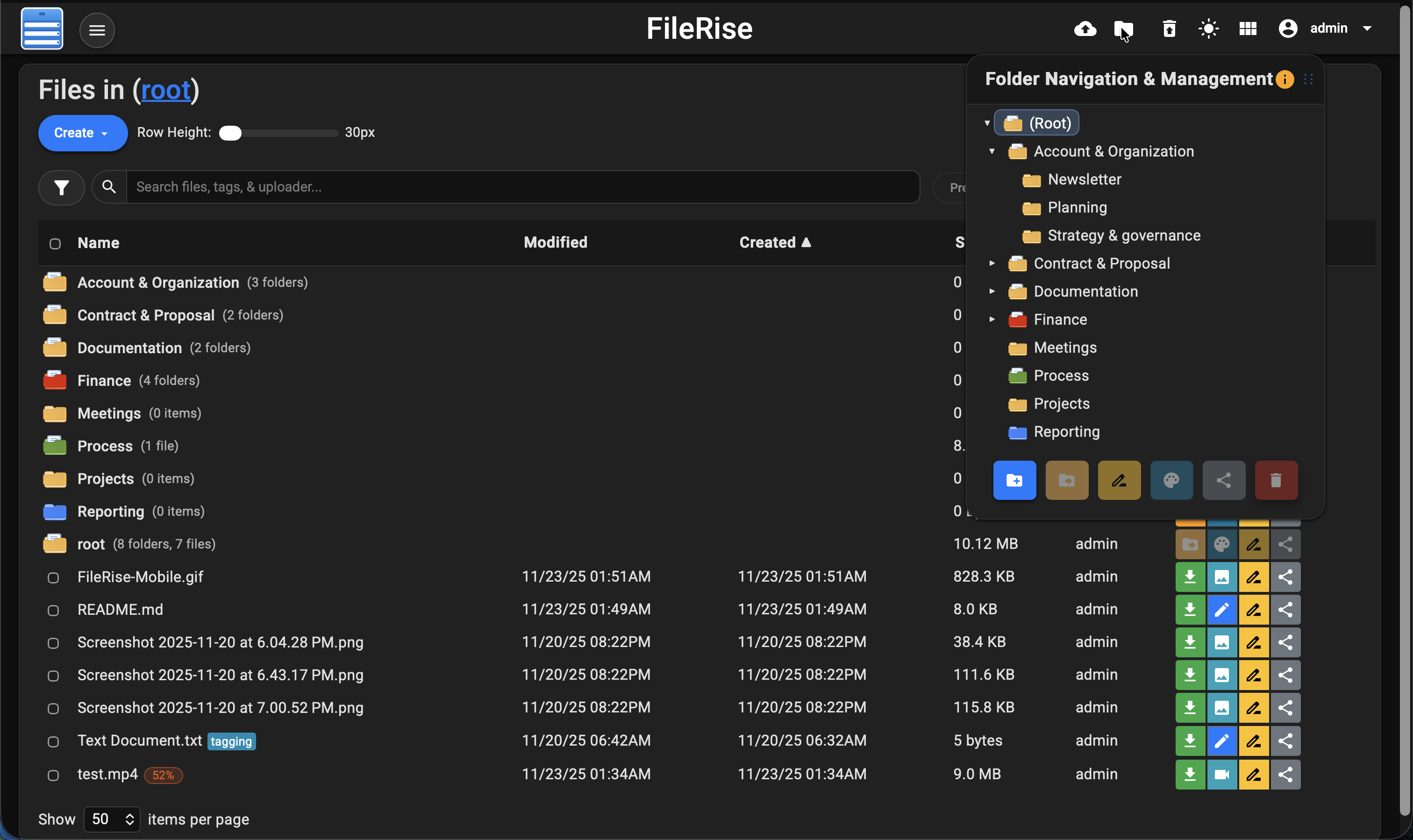
**Dark mode:**
|
||
|
||
|
||
---
|
||
|
||
## Features at a Glance or [Full Features Wiki](https://github.com/error311/FileRise/wiki/Features)
|
||
|
||
- 🚀 **Easy File Uploads:** Upload multiple files and folders via drag & drop or file picker. Supports large files with pause/resumable chunked uploads and shows real-time progress for each file. FileRise will pick up where it left off if your connection drops.
|
||
|
||
- 🗂️ **File Management:** Full set of file/folder operations – move or copy files (via intuitive drag-drop or dialogs), rename items, and delete in batches. You can download selected files as a ZIP archive or extract uploaded ZIP files server-side. Organize content with an interactive folder tree and breadcrumb navigation for quick jumps.
|
||
|
||
- 🗃️ **Folder Sharing & File Sharing:** Share entire folders via secure, expiring public links. Folder shares can be password-protected, and shared folders support file uploads from outside users with a separate, secure upload mechanism. Folder listings are paginated (10 items per page) with navigation controls; file sizes are displayed in MB for clarity. Share individual files with one-time or expiring links (optional password protection).
|
||
|
||
- 🔌 **WebDAV Support:** Mount FileRise as a network drive **or use it head-less from the CLI**. Standard WebDAV operations (upload / download / rename / delete) work in Cyberduck, WinSCP, GNOME Files, Finder, etc., and you can also script against it with `curl` – see the [WebDAV](https://github.com/error311/FileRise/wiki/WebDAV) + [curl](https://github.com/error311/FileRise/wiki/Accessing-FileRise-via-curl-(WebDAV)) quick-starts. Folder-Only users are restricted to their personal directory; admins and unrestricted users have full access.
|
||
|
||
- 📚 **API Documentation:** Auto-generated OpenAPI spec (`openapi.json`) and interactive HTML docs (`api.html`) powered by Redoc.
|
||
|
||
- 📝 **Built-in Editor & Preview:** View images, videos, audio, and PDFs inline with a preview modal. Edit text/code files in your browser with a CodeMirror-based editor featuring syntax highlighting and line numbers.
|
||
|
||
- 🏷️ **Tags & Search:** Categorize your files with color-coded tags and locate them instantly using indexed real-time search. **Advanced Search** adds fuzzy matching across file names, tags, uploader fields, and within text file contents.
|
||
|
||
- 🔒 **User Authentication & Permissions:** Username/password login with multi-user support (admin UI). Current permissions: **Folder-only**, **Read-only**, **Disable upload**. SSO via OIDC providers (Google/Authentik/Keycloak) and optional TOTP 2FA.
|
||
|
||
- 🎨 **Responsive UI (Dark/Light Mode):** Mobile-friendly layout with theme toggle. The interface remembers your preferences (layout, items per page, last visited folder, etc.).
|
||
|
||
- 🌐 **Internationalization & Localization:** Switch languages via the UI (English, Spanish, French, German). Contributions welcome.
|
||
|
||
- 🗑️ **Trash & File Recovery:** Deleted items go to Trash first; admins can restore or empty. Old trash entries auto-purge (default 3 days).
|
||
|
||
- ⚙️ **Lightweight & Self-Contained:** Runs on PHP **8.3+** with no external database. Single-folder install or Docker image. Low footprint; scales to thousands of files with pagination and sorting.
|
||
|
||
(For full features and changelogs, see the [Wiki](https://github.com/error311/FileRise/wiki), [CHANGELOG](https://github.com/error311/FileRise/blob/master/CHANGELOG.md) or [Releases](https://github.com/error311/FileRise/releases).)
|
||
|
||
---
|
||
|
||
## Live Demo
|
||
|
||
[](https://demo.filerise.net)
|
||
**Demo credentials:** `demo` / `demo`
|
||
|
||
Curious about the UI? **Check out the live demo:** <https://demo.filerise.net> (login with username “demo” and password “demo”). *The demo is read-only for security*. Explore the interface, switch themes, preview files, and see FileRise in action!
|
||
|
||
---
|
||
|
||
## Installation & Setup
|
||
|
||
Deploy FileRise using the **Docker image** (quickest) or a **manual install** on a PHP web server.
|
||
|
||
---
|
||
|
||
### 1) Running with Docker (Recommended)
|
||
|
||
#### Pull the image
|
||
|
||
```bash
|
||
docker pull error311/filerise-docker:latest
|
||
```
|
||
|
||
#### Run a container
|
||
|
||
```bash
|
||
docker run -d \
|
||
--name filerise \
|
||
-p 8080:80 \
|
||
-e TIMEZONE="America/New_York" \
|
||
-e DATE_TIME_FORMAT="m/d/y h:iA" \
|
||
-e TOTAL_UPLOAD_SIZE="5G" \
|
||
-e SECURE="false" \
|
||
-e PERSISTENT_TOKENS_KEY="please_change_this_@@" \
|
||
-e PUID="1000" \
|
||
-e PGID="1000" \
|
||
-e CHOWN_ON_START="true" \
|
||
-e SCAN_ON_START="true" \
|
||
-e SHARE_URL="" \
|
||
-v ~/filerise/uploads:/var/www/uploads \
|
||
-v ~/filerise/users:/var/www/users \
|
||
-v ~/filerise/metadata:/var/www/metadata \
|
||
error311/filerise-docker:latest
|
||
```
|
||
|
||
This starts FileRise on port **8080** → visit `http://your-server-ip:8080`.
|
||
|
||
**Notes**
|
||
|
||
- **Do not use** Docker `--user`. Use **PUID/PGID** to map on-disk ownership (e.g., `1000:1000`; on Unraid typically `99:100`).
|
||
- `CHOWN_ON_START=true` is recommended on **first run**. Set to **false** later for faster restarts.
|
||
- `SCAN_ON_START=true` indexes files added outside the UI so their metadata appears.
|
||
- `SHARE_URL` optional; leave blank to auto-detect host/scheme. Set to site root (e.g., `https://files.example.com`) if needed.
|
||
- Set `SECURE="true"` if you serve via HTTPS at your proxy layer.
|
||
|
||
**Verify ownership mapping (optional)**
|
||
|
||
```bash
|
||
docker exec -it filerise id www-data
|
||
# expect: uid=1000 gid=1000 (or 99/100 on Unraid)
|
||
```
|
||
|
||
#### Using Docker Compose
|
||
|
||
Save as `docker-compose.yml`, then `docker-compose up -d`:
|
||
|
||
```yaml
|
||
version: "3"
|
||
services:
|
||
filerise:
|
||
image: error311/filerise-docker:latest
|
||
ports:
|
||
- "8080:80"
|
||
environment:
|
||
TIMEZONE: "UTC"
|
||
DATE_TIME_FORMAT: "m/d/y h:iA"
|
||
TOTAL_UPLOAD_SIZE: "10G"
|
||
SECURE: "false"
|
||
PERSISTENT_TOKENS_KEY: "please_change_this_@@"
|
||
# Ownership & indexing
|
||
PUID: "1000" # Unraid users often use 99
|
||
PGID: "1000" # Unraid users often use 100
|
||
CHOWN_ON_START: "true" # first run; set to "false" afterwards
|
||
SCAN_ON_START: "true" # index files added outside the UI at boot
|
||
# Sharing URL (optional): leave blank to auto-detect from host/scheme
|
||
SHARE_URL: ""
|
||
volumes:
|
||
- ./uploads:/var/www/uploads
|
||
- ./users:/var/www/users
|
||
- ./metadata:/var/www/metadata
|
||
```
|
||
|
||
Access at `http://localhost:8080` (or your server’s IP).
|
||
The example sets a custom `PERSISTENT_TOKENS_KEY`—change it to a strong random string.
|
||
|
||
**First-time Setup**
|
||
On first launch, if no users exist, you’ll be prompted to create an **Admin account**. Then use **User Management** to add more users.
|
||
|
||
---
|
||
|
||
### 2) Manual Installation (PHP/Apache)
|
||
|
||
If you prefer a traditional web server (LAMP stack or similar):
|
||
|
||
**Requirements**
|
||
|
||
- PHP **8.3+**
|
||
- Apache (mod_php) or another web server configured for PHP
|
||
- PHP extensions: `json`, `curl`, `zip` (and typical defaults). No database required.
|
||
|
||
**Download Files**
|
||
|
||
```bash
|
||
git clone https://github.com/error311/FileRise.git
|
||
```
|
||
|
||
Place the files in your web root (e.g., `/var/www/`). Subfolder installs are fine.
|
||
|
||
**Composer (if applicable)**
|
||
|
||
```bash
|
||
composer install
|
||
```
|
||
|
||
**Folders & Permissions**
|
||
|
||
```bash
|
||
mkdir -p uploads users metadata
|
||
chown -R www-data:www-data uploads users metadata # use your web user
|
||
chmod -R 775 uploads users metadata
|
||
```
|
||
|
||
- `uploads/`: actual files
|
||
- `users/`: credentials & token storage
|
||
- `metadata/`: file metadata (tags, share links, etc.)
|
||
|
||
**Configuration**
|
||
|
||
Edit `config.php`:
|
||
|
||
- `TIMEZONE`, `DATE_TIME_FORMAT` for your locale.
|
||
- `TOTAL_UPLOAD_SIZE` (ensure PHP `upload_max_filesize` and `post_max_size` meet/exceed this).
|
||
- `PERSISTENT_TOKENS_KEY` for “Remember Me” tokens.
|
||
|
||
**Share link base URL**
|
||
|
||
- Set **`SHARE_URL`** via web-server env vars (preferred),
|
||
**or** keep using `BASE_URL` in `config.php` as a fallback.
|
||
- If neither is set, FileRise auto-detects from the current host/scheme.
|
||
|
||
**Web server config**
|
||
|
||
- Apache: allow `.htaccess` or merge its rules; ensure `mod_rewrite` is enabled.
|
||
- Nginx/other: replicate basic protections (no directory listing, deny sensitive files). See Wiki for examples.
|
||
|
||
Browse to your FileRise URL; you’ll be prompted to create the Admin user on first load.
|
||
|
||
---
|
||
|
||
## Unraid
|
||
|
||
- Install from **Community Apps** → search **FileRise**.
|
||
- Default **bridge**: access at `http://SERVER_IP:8080/`.
|
||
- **Custom br0** (own IP): map host ports to **80/443** if you want bare `http://CONTAINER_IP/` without a port.
|
||
- See the [support thread](https://forums.unraid.net/topic/187337-support-filerise/) for Unraid-specific help.
|
||
|
||
---
|
||
|
||
## Quick-start: Mount via WebDAV
|
||
|
||
Once FileRise is running, enable WebDAV in the admin panel.
|
||
|
||
```bash
|
||
# Linux (GVFS/GIO)
|
||
gio mount dav://demo@your-host/webdav.php/
|
||
|
||
# macOS (Finder → Go → Connect to Server…)
|
||
https://your-host/webdav.php/
|
||
```
|
||
|
||
> Finder typically uses `https://` (or `http://`) URLs for WebDAV, while GNOME/KDE use `dav://` / `davs://`.
|
||
|
||
### Windows (File Explorer)
|
||
|
||
- Open **File Explorer** → Right-click **This PC** → **Map network drive…**
|
||
- Choose a drive letter (e.g., `Z:`).
|
||
- In **Folder**, enter:
|
||
|
||
```text
|
||
https://your-host/webdav.php/
|
||
```
|
||
|
||
- Check **Connect using different credentials**, then enter your FileRise username/password.
|
||
- Click **Finish**.
|
||
|
||
> **Important:**
|
||
> Windows requires HTTPS (SSL) for WebDAV connections by default.
|
||
> If your server uses plain HTTP, you must adjust a registry setting:
|
||
>
|
||
> 1. Open **Registry Editor** (`regedit.exe`).
|
||
> 2. Navigate to:
|
||
>
|
||
> ```text
|
||
> HKEY_LOCAL_MACHINE\SYSTEM\CurrentControlSet\Services\WebClient\Parameters
|
||
> ```
|
||
>
|
||
> 3. Find or create a `DWORD` value named **BasicAuthLevel**.
|
||
> 4. Set its value to `2`.
|
||
> 5. Restart the **WebClient** service or reboot.
|
||
|
||
📖 See the full [WebDAV Usage Wiki](https://github.com/error311/FileRise/wiki/WebDAV) for SSL setup, HTTP workaround, and troubleshooting.
|
||
|
||
---
|
||
|
||
## FAQ / Troubleshooting
|
||
|
||
- **“Upload failed” or large files not uploading:** Ensure `TOTAL_UPLOAD_SIZE` in config and PHP’s `post_max_size` / `upload_max_filesize` are set high enough. For extremely large files, you might need to increase `max_execution_time` or rely on resumable uploads in smaller chunks.
|
||
|
||
- **How to enable HTTPS?** FileRise doesn’t terminate TLS itself. Run it behind a reverse proxy (Nginx, Caddy, Apache with SSL) or use a companion like nginx-proxy or Caddy in Docker. Set `SECURE="true"` in Docker so FileRise generates HTTPS links.
|
||
|
||
- **Changing Admin or resetting password:** Admin can change any user’s password via **User Management**. If you lose admin access, edit the `users/users.txt` file on the server – passwords are hashed (bcrypt), but you can delete the admin line and restart the app to trigger the setup flow again.
|
||
|
||
- **Where are my files stored?** In the `uploads/` directory (or the path you set). Deleted files move to `uploads/trash/`. Tag information is in `metadata/file_metadata.json` and trash metadata in `metadata/trash.json`, etc. Backups are recommended.
|
||
|
||
- **Updating FileRise:** For Docker, pull the new image and recreate the container. For manual installs, download the latest release and replace files (keep your `config.php` and `uploads/users/metadata`). Clear your browser cache if UI assets changed.
|
||
|
||
For more Q&A or to ask for help, open a Discussion or Issue.
|
||
|
||
---
|
||
|
||
## Security posture
|
||
|
||
We practice responsible disclosure. All known security issues are fixed in **v1.5.0** (ACL hardening).
|
||
Advisories: [GHSA-6p87-q9rh-95wh](https://github.com/error311/FileRise/security/advisories/GHSA-6p87-q9rh-95wh) (≤ 1.3.15), [GHSA-jm96-2w52-5qjj](https://github.com/error311/FileRise/security/advisories/GHSA-jm96-2w52-5qjj) (v1.4.0). Fixed in **v1.5.0**. Thanks to [@kiwi865](https://github.com/kiwi865) for reporting.
|
||
If you’re running ≤1.4.x, please upgrade.
|
||
|
||
See also: [SECURITY.md](./SECURITY.md) for how to report vulnerabilities.
|
||
|
||
---
|
||
|
||
## Contributing
|
||
|
||
Contributions are welcome! See [CONTRIBUTING.md](CONTRIBUTING.md).
|
||
Areas to help: translations, bug fixes, UI polish, integrations.
|
||
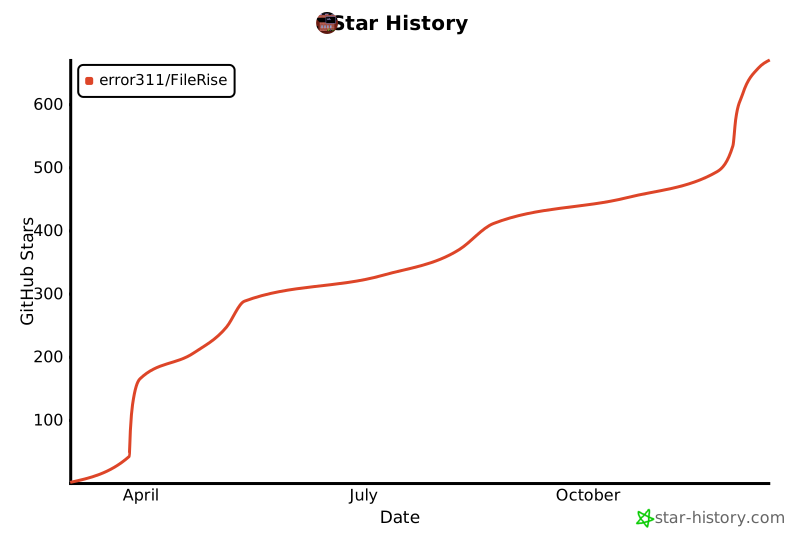
If you like FileRise, a ⭐ star on GitHub is much appreciated!
|
||
|
||
---
|
||
|
||
## Community and Support
|
||
|
||
- **Reddit:** [r/selfhosted: FileRise Discussion](https://www.reddit.com/r/selfhosted/comments/1kfxo9y/filerise_v131_major_updates_sneak_peek_at_whats/) – (Announcement and user feedback thread).
|
||
- **Unraid Forums:** [FileRise Support Thread](https://forums.unraid.net/topic/187337-support-filerise/) – for Unraid-specific support or issues.
|
||
- **GitHub Discussions:** Use Q&A for setup questions, Ideas for enhancements.
|
||
|
||
[](https://star-history.com/#error311/FileRise&Date)
|
||
|
||
---
|
||
|
||
## Dependencies
|
||
|
||
### PHP Libraries
|
||
|
||
- **[jumbojett/openid-connect-php](https://github.com/jumbojett/OpenID-Connect-PHP)** (v^1.0.0)
|
||
- **[phpseclib/phpseclib](https://github.com/phpseclib/phpseclib)** (v~3.0.7)
|
||
- **[robthree/twofactorauth](https://github.com/RobThree/TwoFactorAuth)** (v^3.0)
|
||
- **[endroid/qr-code](https://github.com/endroid/qr-code)** (v^5.0)
|
||
- **[sabre/dav](https://github.com/sabre-io/dav)** (^4.4)
|
||
|
||
### Client-Side Libraries
|
||
|
||
- **Google Fonts** – [Roboto](https://fonts.google.com/specimen/Roboto) and **Material Icons** ([Google Material Icons](https://fonts.google.com/icons))
|
||
- **[Bootstrap](https://getbootstrap.com/)** (v4.5.2)
|
||
- **[CodeMirror](https://codemirror.net/)** (v5.65.5) – For code editing functionality.
|
||
- **[Resumable.js](https://github.com/23/resumable.js/)** (v1.1.0) – For file uploads.
|
||
- **[DOMPurify](https://github.com/cure53/DOMPurify)** (v2.4.0) – For sanitizing HTML.
|
||
- **[Fuse.js](https://fusejs.io/)** (v6.6.2) – For indexed, fuzzy searching.
|
||
|
||
---
|
||
|
||
## Acknowledgments
|
||
|
||
- Based on [uploader](https://github.com/sensboston/uploader) by @sensboston.
|
||
|
||
---
|
||
|
||
## License
|
||
|
||
MIT License – see [LICENSE](LICENSE).
|