
FileRise






FileRise is a modern, self-hosted web file manager / WebDAV server.
Drag & drop uploads, ACL-aware sharing, OnlyOffice integration, and a clean UI — all in a single PHP app that you control.
- 💾 Self-hosted “cloud drive” – Runs anywhere with PHP (or via Docker). No external DB required.
- 🔐 Granular per-folder ACLs – View / Own / Upload / Edit / Delete / Share, enforced across UI, API, and WebDAV.
- 🔄 Fast drag-and-drop uploads – Chunked, resumable uploads with pause/resume and progress.
- 🌳 Scales to huge trees – Tested with 100k+ folders in the sidebar tree.
- 🧩 ONLYOFFICE support (optional) – Edit DOCX/XLSX/PPTX using your own Document Server.
- 🌍 WebDAV – Mount FileRise as a drive from macOS, Windows, Linux, or Cyberduck/WinSCP.
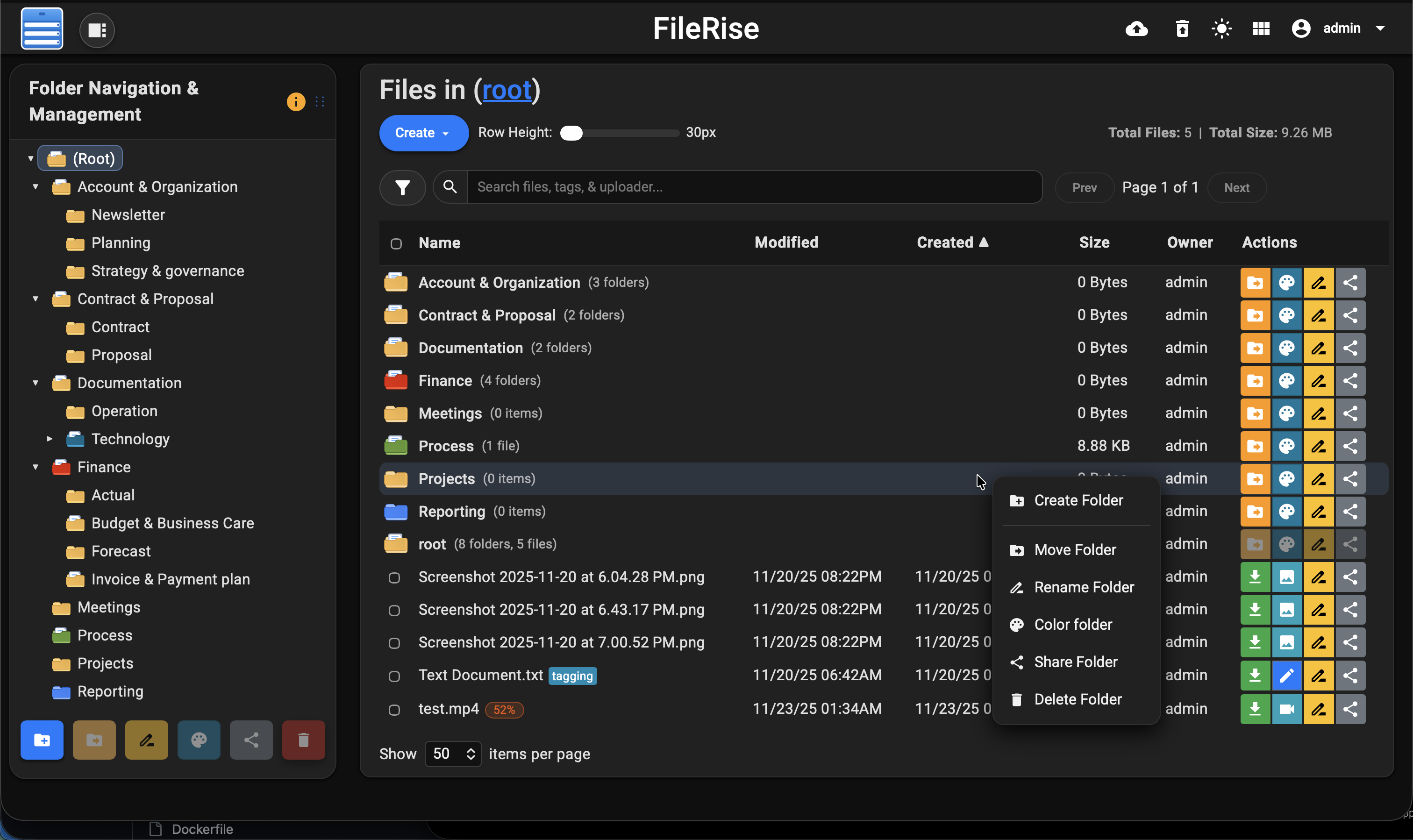
- 🎨 Polished UI – Dark/light mode, responsive layout, in-browser previews & code editor.
- 🔑 Login + SSO – Local users, TOTP 2FA, and OIDC (Auth0 / Authentik / Keycloak / etc.).
- 👥 User groups & client portals (Pro) – Group-based ACLs and brandable client upload portals.
💡 Looking for FileRise Pro (brandable header, user groups, client upload portals, license handling)? Check out filerise.net – FileRise Core stays fully open-source (MIT).
Quick links
- 🚀 Live demo: Demo (username:
demo/ password:demo) - 📚 Docs & Wiki: Wiki
- 🐳 Docker image: Docker
- 📝 Changelog: Changes
1. What FileRise does
FileRise turns a folder on your server into a web‑based file explorer with:
- Folder tree + breadcrumbs for fast navigation
- Multi‑file/folder drag‑and‑drop uploads
- Move / copy / rename / delete / extract ZIP
- Public share links (optionally password‑protected & expiring)
- Tagging and search by name, tag, uploader, and content
- Trash with restore/purge
- Inline previews (images, audio, video, PDF) and a built‑in code editor
Everything flows through a single ACL engine, so permissions are enforced consistently whether users are in the browser UI, using WebDAV, or hitting the API.
2. Install (Docker – recommended)
The easiest way to run FileRise is the official Docker image.
docker run -d --name filerise -p 8080:80 -e TIMEZONE="America/New_York" -e PERSISTENT_TOKENS_KEY="change_me_to_a_random_string" -v ~/filerise/uploads:/var/www/uploads -v ~/filerise/users:/var/www/users -v ~/filerise/metadata:/var/www/metadata error311/filerise-docker:latest
Then visit:
http://your-server-ip:8080
On first launch you’ll be guided through creating the initial admin user.
More Docker options (Unraid, docker‑compose, env vars, reverse proxy, etc.)
See the Docker repo: docker repo
3. Manual install (PHP web server)
Prefer bare‑metal or your own stack? FileRise is just PHP + a few extensions.
Requirements
- PHP 8.3+
- Web server (Apache / Nginx / Caddy + PHP‑FPM)
- PHP extensions:
json,curl,zip(and usual defaults) - No database required
Steps
-
Clone or download FileRise into your web root:
git clone https://github.com/error311/FileRise.git -
Create data directories and set permissions:
cd FileRise mkdir -p uploads users metadata chown -R www-data:www-data uploads users metadata # adjust for your web user chmod -R 775 uploads users metadata -
(Optional) Install PHP dependencies with Composer:
composer install -
Configure PHP (upload limits / timeouts) and ensure rewrites are enabled.
- Apache: allow
.htaccessor copy its rules into your vhost. - Nginx/Caddy: mirror the basic protections (no directory listing, block sensitive files).
- Apache: allow
-
Browse to your FileRise URL and follow the admin setup screen.
For detailed examples and reverse proxy snippets, see the Installation page in the Wiki.
4. WebDAV & ONLYOFFICE (optional)
WebDAV
Once enabled in the Admin panel, FileRise exposes a WebDAV endpoint (e.g. /webdav.php). Use it with:
- macOS Finder – Go → Connect to Server →
https://your-host/webdav.php/ - Windows File Explorer – Map Network Drive →
https://your-host/webdav.php/ - Linux (GVFS/Nautilus) –
dav://your-host/webdav.php/ - Clients like Cyberduck, WinSCP, etc.
WebDAV operations honor the same ACLs as the web UI.
See: WebDAV
ONLYOFFICE integration
If you run an ONLYOFFICE Document Server you can open/edit Office documents directly from FileRise (DOCX, XLSX, PPTX, ODT, ODS, ODP; PDFs view‑only).
Configure it in Admin → ONLYOFFICE:
- Enable ONLYOFFICE
- Set your Document Server origin (e.g.
https://docs.example.com) - Configure a shared JWT secret
- Copy the suggested Content‑Security‑Policy header into your reverse proxy
Docs: ONLYOFFICE
5. Security & updates
- FileRise is actively maintained and has published security advisories.
- See SECURITY.md and GitHub Security Advisories for details.
- To upgrade:
- Docker:
docker pull error311/filerise-docker:latestand recreate the container with the same volumes. - Manual: replace app files with the latest release (keep
uploads/,users/,metadata/, and your config).
- Docker:
Please report vulnerabilities responsibly via the channels listed in SECURITY.md.
6. Community, support & contributing
- 🧵 GitHub Discussions & Issues: ask questions, report bugs, suggest features.
- 💬 Unraid forum thread: for Unraid‑specific setup and tuning.
- 🌍 Reddit / self‑hosting communities: occasional release posts & feedback threads.
Contributions are welcome — from bug fixes and docs to translations and UI polish.
See CONTRIBUTING.md for guidelines.
If FileRise saves you time or becomes your daily driver, a ⭐ on GitHub or sponsorship is hugely appreciated:
- ❤️ GitHub Sponsors
- ☕ Ko‑fi
7. License & third‑party code
FileRise Core is released under the MIT License – see LICENSE.
It bundles a small set of well‑known client and server libraries (Bootstrap, CodeMirror, DOMPurify, Fuse.js, Resumable.js, sabre/dav, etc.).
All third‑party code remains under its original licenses.
See THIRD_PARTY.md and the licenses/ folder for full details.