
493 lines
24 KiB
Markdown
493 lines
24 KiB
Markdown
# FileRise
|
||
|
||
[](https://github.com/error311/FileRise)
|
||
[](https://hub.docker.com/r/error311/filerise-docker)
|
||
[](https://github.com/error311/filerise-docker/actions/workflows/main.yml)
|
||
[](https://github.com/error311/FileRise/actions/workflows/ci.yml)
|
||
[](https://demo.filerise.net)
|
||
[](https://github.com/error311/FileRise/releases)
|
||
[](LICENSE)
|
||
[](https://github.com/sponsors/error311)
|
||
[](https://ko-fi.com/error311)
|
||
|
||
**Quick links:** [Demo](#live-demo) • [Install](#installation--setup) • [Docker](#1-running-with-docker-recommended) • [Unraid](#unraid) • [WebDAV](#quick-start-mount-via-webdav) • [ONLYOFFICE](#quick-start-onlyoffice-optional) • [FAQ](#faq--troubleshooting)
|
||
|
||
**Elevate your File Management** – A modern, self-hosted web file manager.
|
||
Upload, organize, and share files or folders through a sleek, responsive web interface.
|
||
**FileRise** is lightweight yet powerful — your personal cloud drive that you fully control.
|
||
|
||
Now featuring **Granular Access Control (ACL)** with per-folder permissions, inheritance, and live admin editing.
|
||
Grant precise capabilities like *view*, *upload*, *rename*, *delete*, or *manage* on a per-user, per-folder basis — enforced across the UI, API, and WebDAV.
|
||
|
||
With drag-and-drop uploads, in-browser editing, secure user logins (SSO & TOTP 2FA), and one-click public sharing, **FileRise** brings professional-grade file management to your own server — simple to deploy, easy to scale, and fully self-hosted.
|
||
|
||
New: Open and edit Office documents — **Word (DOCX)**, **Excel (XLSX)**, **PowerPoint (PPTX)** — directly in **FileRise** using your self-hosted **ONLYOFFICE Document Server** (optional). Open **ODT/ODS/ODP**, and view **PDFs** inline. Where supported by your Document Server, users can add **comments/annotations** to documents (and PDFs). Everything is enforced by the same per-folder ACLs across the UI and WebDAV.
|
||
|
||
> ⚠️ **Security fix in v1.5.0** — ACL hardening. If you’re on ≤1.4.x, please upgrade.
|
||
|
||
**10/25/2025 Video demo:**
|
||
|
||
<https://github.com/user-attachments/assets/a2240300-6348-4de7-b72f-1b85b7da3a08>
|
||
|
||
**Dark mode:**
|
||
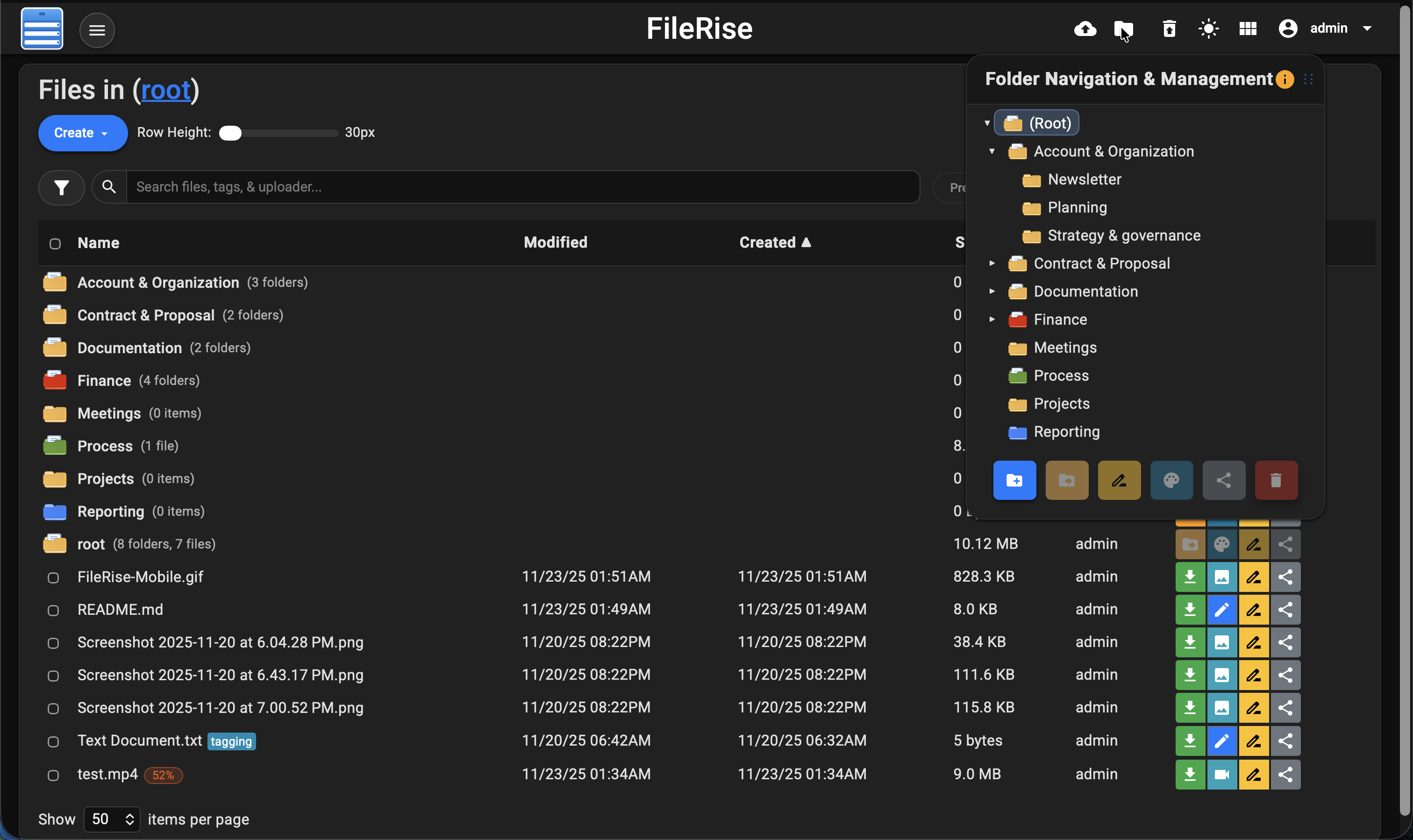
|
||
|
||
---
|
||
|
||
## Features at a Glance or [Full Features Wiki](https://github.com/error311/FileRise/wiki/Features)
|
||
|
||
- 🚀 **Easy File Uploads:** Upload multiple files and folders via drag & drop or file picker. Supports large files with resumable chunked uploads, pause/resume, and real-time progress. If your connection drops, FileRise resumes automatically.
|
||
|
||
- 🗂️ **File Management:** Full suite of operations — move/copy (via drag-drop or dialogs), rename, and batch delete. Download selected files as ZIPs or extract uploaded ZIPs server-side. Organize with an interactive folder tree and breadcrumbs for instant navigation.
|
||
|
||
- 🗃️ **Folder & File Sharing:** Share folders or individual files with expiring, optionally password-protected links. Shared folders can accept external uploads (if enabled). Listings are paginated (10 items/page) with file sizes shown in MB.
|
||
|
||
- 🔐 **Granular Access Control (ACL):**
|
||
Per-folder permissions for **owners**, **view**, **view (own)**, **write**, **manage**, **share**, and extended granular capabilities.
|
||
Each grant controls specific actions across the UI, API, and WebDAV:
|
||
|
||
| Permission | Description |
|
||
|-------------|-------------|
|
||
| **Manage (Owner)** | Full control of folder and subfolders. Can edit ACLs, rename/delete/create folders, and share items. Implies all other permissions for that folder and below. |
|
||
| **View (All)** | Allows viewing all files within the folder. Required for folder-level sharing. |
|
||
| **View (Own)** | Restricts visibility to files uploaded by the user only. Ideal for drop zones or limited-access users. |
|
||
| **Write** | Grants general write access — enables renaming, editing, moving, copying, deleting, and extracting files. |
|
||
| **Create** | Allows creating subfolders. Automatically granted to *Manage* users. |
|
||
| **Upload** | Allows uploading new files without granting full write privileges. |
|
||
| **Edit / Rename / Copy / Move / Delete / Extract** | Individually toggleable granular file operations. |
|
||
| **Share File / Share Folder** | Controls sharing capabilities. Folder shares require full View (All). |
|
||
|
||
- **Automatic Propagation:** Enabling **Manage** on a folder applies to all subfolders; deselecting subfolder permissions overrides inheritance in the UI.
|
||
|
||
ACL enforcement is centralized and atomic across:
|
||
- **Admin Panel:** Interactive ACL editor with batch save and dynamic inheritance visualization.
|
||
- **API Endpoints:** All file/folder operations validate server-side.
|
||
- **WebDAV:** Uses the same ACL engine — View / Own determine listings, granular permissions control upload/edit/delete/create.
|
||
|
||
- 🔌 **WebDAV (ACL-Aware):** Mount FileRise as a drive (Cyberduck, WinSCP, Finder, etc.) or access via `curl`.
|
||
- Listings require **View** or **View (Own)**.
|
||
- Uploads require **Upload**.
|
||
- Overwrites require **Edit**.
|
||
- Deletes require **Delete**.
|
||
- Creating folders requires **Create** or **Manage**.
|
||
- All ACLs and ownership rules are enforced exactly as in the web UI.
|
||
|
||
- 📚 **API Documentation:** Auto-generated OpenAPI spec (`openapi.json`) with interactive HTML docs (`api.html`) via Redoc.
|
||
|
||
- 📝 **Built-in Editor & Preview:** Inline preview for images, video, audio, and PDFs. CodeMirror-based editor for text/code with syntax highlighting and line numbers.
|
||
|
||
- 🧩 **Office Docs (ONLYOFFICE, optional):** View/edit DOCX, XLSX, PPTX (and ODT/ODS/ODP, PDF view) using your self-hosted ONLYOFFICE Document Server. Enforced by the same ACLs as the web UI & WebDAV.
|
||
|
||
- 🏷️ **Tags & Search:** Add color-coded tags and search by name, tag, uploader, or content. Advanced fuzzy search indexes metadata and file contents.
|
||
|
||
- 🔒 **Authentication & SSO:** Username/password, optional TOTP 2FA, and OIDC (Google, Authentik, Keycloak).
|
||
|
||
- 🗑️ **Trash & Recovery:** Deleted items move to Trash for recovery (default 3-day retention). Admins can restore or purge globally.
|
||
|
||
- 🎨 **Responsive UI (Dark/Light Mode):** Modern, mobile-friendly design with persistent preferences (theme, layout, last folder, etc.).
|
||
|
||
- 🌐 **Internationalization:** English, Spanish, French, German & Simplified Chinese available. Community translations welcome.
|
||
|
||
- ⚙️ **Lightweight & Self-Contained:** Runs on PHP 8.3+, no external DB required. Single-folder or Docker deployment with minimal footprint, optimized for Unraid and self-hosting.
|
||
|
||
(For full features and changelogs, see the [Wiki](https://github.com/error311/FileRise/wiki), [CHANGELOG](https://github.com/error311/FileRise/blob/master/CHANGELOG.md) or [Releases](https://github.com/error311/FileRise/releases).)
|
||
|
||
---
|
||
|
||
## Live Demo
|
||
|
||
[](https://demo.filerise.net)
|
||
**Demo credentials:** `demo` / `demo`
|
||
|
||
Curious about the UI? **Check out the live demo:** <https://demo.filerise.net> (login with username “demo” and password “demo”). **The demo is read-only for security.** Explore the interface, switch themes, preview files, and see FileRise in action!
|
||
|
||
---
|
||
|
||
## Installation & Setup
|
||
|
||
Deploy FileRise using the **Docker image** (quickest) or a **manual install** on a PHP web server.
|
||
|
||
---
|
||
|
||
### Environment variables
|
||
|
||
| Variable | Default | Purpose |
|
||
|---|---|---|
|
||
| `TIMEZONE` | `UTC` | PHP/app timezone. |
|
||
| `DATE_TIME_FORMAT` | `m/d/y h:iA` | Display format used in UI. |
|
||
| `TOTAL_UPLOAD_SIZE` | `5G` | Max combined upload per request (resumable). |
|
||
| `SECURE` | `false` | Set `true` if served behind HTTPS proxy (affects link generation). |
|
||
| `PERSISTENT_TOKENS_KEY` | *(required)* | Secret for “Remember Me” tokens. Change from the example! |
|
||
| `PUID` / `PGID` | `1000` / `1000` | Map `www-data` to host uid:gid (Unraid: often `99:100`). |
|
||
| `CHOWN_ON_START` | `true` | First run: try to chown mounted dirs to PUID:PGID. |
|
||
| `SCAN_ON_START` | `true` | Reindex files added outside UI at boot. |
|
||
| `SHARE_URL` | *(blank)* | Override base URL for share links; blank = auto-detect. |
|
||
|
||
---
|
||
|
||
### 1) Running with Docker (Recommended)
|
||
|
||
#### Pull the image
|
||
|
||
```bash
|
||
docker pull error311/filerise-docker:latest
|
||
```
|
||
|
||
#### Run a container
|
||
|
||
```bash
|
||
docker run -d \
|
||
--name filerise \
|
||
-p 8080:80 \
|
||
-e TIMEZONE="America/New_York" \
|
||
-e DATE_TIME_FORMAT="m/d/y h:iA" \
|
||
-e TOTAL_UPLOAD_SIZE="5G" \
|
||
-e SECURE="false" \
|
||
-e PERSISTENT_TOKENS_KEY="default_please_change_this_key" \
|
||
-e PUID="1000" \
|
||
-e PGID="1000" \
|
||
-e CHOWN_ON_START="true" \
|
||
-e SCAN_ON_START="true" \
|
||
-e SHARE_URL="" \
|
||
-v ~/filerise/uploads:/var/www/uploads \
|
||
-v ~/filerise/users:/var/www/users \
|
||
-v ~/filerise/metadata:/var/www/metadata \
|
||
error311/filerise-docker:latest
|
||
```
|
||
|
||
The app runs as www-data mapped to PUID/PGID. Ensure your mounted uploads/, users/, metadata/ are owned by PUID:PGID (e.g., chown -R 1000:1000 …), or set PUID/PGID to match existing host ownership (e.g., 99:100 on Unraid). On NAS/NFS, apply the ownership change on the host/NAS.
|
||
|
||
This starts FileRise on port **8080** → visit `http://your-server-ip:8080`.
|
||
|
||
**Notes**
|
||
|
||
- **Do not use** Docker `--user`. Use **PUID/PGID** to map on-disk ownership (e.g., `1000:1000`; on Unraid typically `99:100`).
|
||
- `CHOWN_ON_START=true` is recommended on **first run**. Set to **false** later for faster restarts.
|
||
- `SCAN_ON_START=true` indexes files added outside the UI so their metadata appears.
|
||
- `SHARE_URL` optional; leave blank to auto-detect host/scheme. Set to site root (e.g., `https://files.example.com`) if needed.
|
||
- Set `SECURE="true"` if you serve via HTTPS at your proxy layer.
|
||
|
||
**Verify ownership mapping (optional)**
|
||
|
||
```bash
|
||
docker exec -it filerise id www-data
|
||
# expect: uid=1000 gid=1000 (or 99/100 on Unraid)
|
||
```
|
||
|
||
#### Using Docker Compose
|
||
|
||
Save as `docker-compose.yml`, then `docker-compose up -d`:
|
||
|
||
```yaml
|
||
services:
|
||
filerise:
|
||
image: error311/filerise-docker:latest
|
||
container_name: filerise
|
||
ports:
|
||
- "8080:80"
|
||
environment:
|
||
TIMEZONE: "UTC"
|
||
DATE_TIME_FORMAT: "m/d/y h:iA"
|
||
TOTAL_UPLOAD_SIZE: "10G"
|
||
SECURE: "false"
|
||
PERSISTENT_TOKENS_KEY: "default_please_change_this_key"
|
||
# Ownership & indexing
|
||
PUID: "1000" # Unraid users often use 99
|
||
PGID: "1000" # Unraid users often use 100
|
||
CHOWN_ON_START: "true" # first run; set to "false" afterwards
|
||
SCAN_ON_START: "true" # index files added outside the UI at boot
|
||
# Sharing URL (optional): leave blank to auto-detect from host/scheme
|
||
SHARE_URL: ""
|
||
volumes:
|
||
- ./uploads:/var/www/uploads
|
||
- ./users:/var/www/users
|
||
- ./metadata:/var/www/metadata
|
||
restart: unless-stopped
|
||
```
|
||
|
||
Access at `http://localhost:8080` (or your server’s IP).
|
||
The example sets a custom `PERSISTENT_TOKENS_KEY`—change it to a strong random string.
|
||
|
||
- “`CHOWN_ON_START=true` attempts to align ownership **inside the container**; if the host/NAS disallows changes, set the correct UID/GID on the host.”
|
||
|
||
**First-time Setup**
|
||
On first launch, if no users exist, you’ll be prompted to create an **Admin account**. Then use **User Management** to add more users.
|
||
|
||
---
|
||
|
||
### 2) Manual Installation (PHP/Apache)
|
||
|
||
If you prefer a traditional web server (LAMP stack or similar):
|
||
|
||
**Requirements**
|
||
|
||
- PHP **8.3+**
|
||
- Apache (mod_php) or another web server configured for PHP
|
||
- PHP extensions: `json`, `curl`, `zip` (and typical defaults). No database required.
|
||
|
||
**Download Files**
|
||
|
||
```bash
|
||
git clone https://github.com/error311/FileRise.git
|
||
```
|
||
|
||
Place the files in your web root (e.g., `/var/www/`). Subfolder installs are fine.
|
||
|
||
**Composer (if applicable)**
|
||
|
||
```bash
|
||
composer install
|
||
```
|
||
|
||
**Folders & Permissions**
|
||
|
||
```bash
|
||
mkdir -p uploads users metadata
|
||
chown -R www-data:www-data uploads users metadata # use your web user
|
||
chmod -R 775 uploads users metadata
|
||
```
|
||
|
||
- `uploads/`: actual files
|
||
- `users/`: credentials & token storage
|
||
- `metadata/`: file metadata (tags, share links, etc.)
|
||
|
||
**Configuration**
|
||
|
||
Edit `config.php`:
|
||
|
||
- `TIMEZONE`, `DATE_TIME_FORMAT` for your locale.
|
||
- `TOTAL_UPLOAD_SIZE` (ensure PHP `upload_max_filesize` and `post_max_size` meet/exceed this).
|
||
- `PERSISTENT_TOKENS_KEY` for “Remember Me” tokens.
|
||
|
||
**Share link base URL**
|
||
|
||
- Set **`SHARE_URL`** via web-server env vars (preferred),
|
||
**or** keep using `BASE_URL` in `config.php` as a fallback.
|
||
- If neither is set, FileRise auto-detects from the current host/scheme.
|
||
|
||
**Web server config**
|
||
|
||
- Apache: allow `.htaccess` or merge its rules; ensure `mod_rewrite` is enabled.
|
||
- Nginx/other: replicate basic protections (no directory listing, deny sensitive files). See Wiki for examples.
|
||
|
||
Browse to your FileRise URL; you’ll be prompted to create the Admin user on first load.
|
||
|
||
---
|
||
|
||
### 3) Admins
|
||
|
||
> **Admins in ACL UI**
|
||
> Admin accounts appear in the Folder Access and User Permissions modals as **read-only** with full access implied. This is by design—admins always have full control and are excluded from save payloads.
|
||
|
||
---
|
||
|
||
## Unraid
|
||
|
||
- Install from **Community Apps** → search **FileRise**.
|
||
- Default **bridge**: access at `http://SERVER_IP:8080/`.
|
||
- **Custom br0** (own IP): map host ports to **80/443** if you want bare `http://CONTAINER_IP/` without a port.
|
||
- See the [support thread](https://forums.unraid.net/topic/187337-support-filerise/) for Unraid-specific help.
|
||
|
||
---
|
||
|
||
## Upgrade
|
||
|
||
```bash
|
||
docker pull error311/filerise-docker:latest
|
||
docker stop filerise && docker rm filerise
|
||
# re-run with the same -v and -e flags you used originally
|
||
```
|
||
|
||
---
|
||
|
||
## Quick-start: Mount via WebDAV
|
||
|
||
Once FileRise is running, enable WebDAV in the admin panel.
|
||
|
||
```bash
|
||
# Linux (GVFS/GIO)
|
||
gio mount dav://demo@your-host/webdav.php/
|
||
|
||
# macOS (Finder → Go → Connect to Server…)
|
||
https://your-host/webdav.php/
|
||
```
|
||
|
||
> Finder typically uses `https://` (or `http://`) URLs for WebDAV, while GNOME/KDE use `dav://` / `davs://`.
|
||
|
||
### Windows (File Explorer)
|
||
|
||
- Open **File Explorer** → Right-click **This PC** → **Map network drive…**
|
||
- Choose a drive letter (e.g., `Z:`).
|
||
- In **Folder**, enter:
|
||
|
||
```text
|
||
https://your-host/webdav.php/
|
||
```
|
||
|
||
- Check **Connect using different credentials**, then enter your FileRise username/password.
|
||
- Click **Finish**.
|
||
|
||
> **Important:**
|
||
> Windows requires HTTPS (SSL) for WebDAV connections by default.
|
||
> If your server uses plain HTTP, you must adjust a registry setting:
|
||
>
|
||
> 1. Open **Registry Editor** (`regedit.exe`).
|
||
> 2. Navigate to:
|
||
>
|
||
> ```text
|
||
> HKEY_LOCAL_MACHINE\SYSTEM\CurrentControlSet\Services\WebClient\Parameters
|
||
> ```
|
||
>
|
||
> 3. Find or create a `DWORD` value named **BasicAuthLevel**.
|
||
> 4. Set its value to `2`.
|
||
> 5. Restart the **WebClient** service or reboot.
|
||
|
||
📖 See the full [WebDAV Usage Wiki](https://github.com/error311/FileRise/wiki/WebDAV) for SSL setup, HTTP workaround, and troubleshooting.
|
||
|
||
---
|
||
|
||
## Quick start: ONLYOFFICE (optional)
|
||
|
||
FileRise can open & edit office docs using your **self-hosted ONLYOFFICE Document Server**.
|
||
|
||
**What you need**
|
||
|
||
- A reachable ONLYOFFICE Document Server (Community/Enterprise).
|
||
- A shared **JWT secret** used by FileRise and your Document Server.
|
||
|
||
**Setup (2–3 minutes)**
|
||
|
||
1. In FileRise go to **Admin → ONLYOFFICE** and:
|
||
- ✅ Enable ONLYOFFICE
|
||
- 🔗 Set **Document Server Origin** (e.g., `https://docs.example.com`)
|
||
- 🔑 Enter **JWT Secret** (click “Replace” to set)
|
||
2. (Recommended) Click **Run tests** in the ONLYOFFICE card:
|
||
- Checks FileRise status, callback reachability, `api.js` load, and iframe embed.
|
||
3. Update your **Content-Security-Policy** to allow the DS origin.
|
||
The Admin panel shows a ready-to-copy line for Apache & Nginx. Example:
|
||
|
||
**Apache**
|
||
|
||
```apache
|
||
Header always set Content-Security-Policy "default-src 'self'; base-uri 'self'; frame-ancestors 'self'; object-src 'none'; script-src 'self' 'sha256-ajmGY+5VJOY6+8JHgzCqsqI8w9dCQfAmqIkFesOKItM=' https://your-onlyoffice-server.example.com https://your-onlyoffice-server.example.com/web-apps/apps/api/documents/api.js; style-src 'self' 'unsafe-inline'; img-src 'self' data: blob:; font-src 'self'; connect-src 'self' https://your-onlyoffice-server.example.com; media-src 'self' blob:; worker-src 'self' blob:; form-action 'self'; frame-src 'self' https://your-onlyoffice-server.example.com"
|
||
```
|
||
|
||
**Nginx**
|
||
|
||
```nginx
|
||
add_header Content-Security-Policy "default-src 'self'; base-uri 'self'; frame-ancestors 'self'; object-src 'none'; script-src 'self' 'sha256-ajmGY+5VJOY6+8JHgzCqsqI8w9dCQfAmqIkFesOKItM=' https://your-onlyoffice-server.example.com https://your-onlyoffice-server.example.com/web-apps/apps/api/documents/api.js; style-src 'self' 'unsafe-inline'; img-src 'self' data: blob:; font-src 'self'; connect-src 'self' https://your-onlyoffice-server.example.com; media-src 'self' blob:; worker-src 'self' blob:; form-action 'self'; frame-src 'self' https://your-onlyoffice-server.example.com" always;
|
||
```
|
||
|
||
**Notes**
|
||
- If your site is https://, your Document Server must also be https:// (or the browser will block it as mixed content).
|
||
- Editor access respects FileRise ACLs (view/edit/share) exactly like the rest of the app.
|
||
|
||
---
|
||
|
||
## FAQ / Troubleshooting
|
||
|
||
- **ONLYOFFICE editor won’t load / blank frame:** Verify CSP allows your DS origin (`script-src`, `frame-src`, `connect-src`) and that the DS is reachable over HTTPS if your site is HTTPS.
|
||
- **“Disabled — check JWT Secret / Origin” in tests:** In **Admin → ONLYOFFICE**, set the Document Server Origin and click “Replace” to save a JWT secret. Then re-run tests.
|
||
|
||
- **“Upload failed” or large files not uploading:** Ensure `TOTAL_UPLOAD_SIZE` in config and PHP’s `post_max_size` / `upload_max_filesize` are set high enough. For extremely large files, you might need to increase `max_execution_time` or rely on resumable uploads in smaller chunks.
|
||
|
||
- **How to enable HTTPS?** FileRise doesn’t terminate TLS itself. Run it behind a reverse proxy (Nginx, Caddy, Apache with SSL) or use a companion like nginx-proxy or Caddy in Docker. Set `SECURE="true"` in Docker so FileRise generates HTTPS links.
|
||
|
||
- **Changing Admin or resetting password:** Admin can change any user’s password via **User Management**. If you lose admin access, edit the `users/users.txt` file on the server – passwords are hashed (bcrypt), but you can delete the admin line and restart the app to trigger the setup flow again.
|
||
|
||
- **Where are my files stored?** In the `uploads/` directory (or the path you set). Deleted files move to `uploads/trash/`. Tag information is in `metadata/file_metadata.json` and trash metadata in `metadata/trash.json`, etc. Backups are recommended.
|
||
|
||
- **Updating FileRise:** For Docker, pull the new image and recreate the container. For manual installs, download the latest release and replace files (keep your `config.php` and `uploads/users/metadata`). Clear your browser cache if UI assets changed.
|
||
|
||
For more Q&A or to ask for help, open a Discussion or Issue.
|
||
|
||
---
|
||
|
||
## Security posture
|
||
|
||
We practice responsible disclosure. All known security issues are fixed in **v1.5.0** (ACL hardening).
|
||
Advisories: [GHSA-6p87-q9rh-95wh](https://github.com/error311/FileRise/security/advisories/GHSA-6p87-q9rh-95wh) (≤ 1.3.15), [GHSA-jm96-2w52-5qjj](https://github.com/error311/FileRise/security/advisories/GHSA-jm96-2w52-5qjj) (v1.4.0). Fixed in **v1.5.0**. Thanks to [@kiwi865](https://github.com/kiwi865) for reporting.
|
||
If you’re running ≤1.4.x, please upgrade.
|
||
|
||
See also: [SECURITY.md](./SECURITY.md) for how to report vulnerabilities.
|
||
|
||
---
|
||
|
||
## Contributing
|
||
|
||
Contributions are welcome! See [CONTRIBUTING.md](CONTRIBUTING.md).
|
||
Areas to help: translations, bug fixes, UI polish, integrations.
|
||
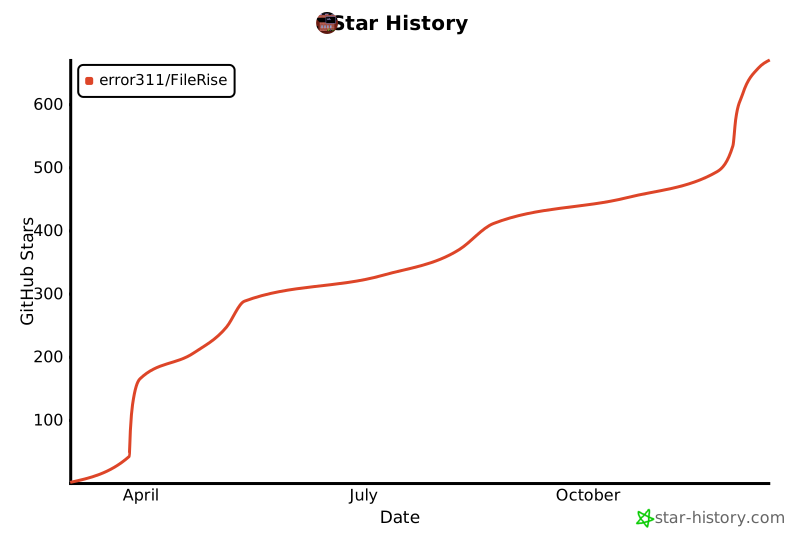
If you like FileRise, a ⭐ star on GitHub is much appreciated!
|
||
|
||
---
|
||
|
||
## 💖 Sponsor FileRise
|
||
|
||
If FileRise saves you time (or sparks joy 😄), please consider supporting ongoing development:
|
||
|
||
- ❤️ [**GitHub Sponsors:**](https://github.com/sponsors/error311) recurring or one-time - helps fund new features and docs.
|
||
- ☕ [**Ko-fi:**](https://ko-fi.com/error311) buy me a coffee.
|
||
|
||
Every bit helps me keep FileRise fast, polished, and well-maintained. Thank you!
|
||
|
||
---
|
||
|
||
## Community and Support
|
||
|
||
- **Reddit:** [r/selfhosted: FileRise Discussion](https://www.reddit.com/r/selfhosted/comments/1kfxo9y/filerise_v131_major_updates_sneak_peek_at_whats/) – (Announcement and user feedback thread).
|
||
- **Unraid Forums:** [FileRise Support Thread](https://forums.unraid.net/topic/187337-support-filerise/) – for Unraid-specific support or issues.
|
||
- **GitHub Discussions:** Use Q&A for setup questions, Ideas for enhancements.
|
||
|
||
[](https://star-history.com/#error311/FileRise&Date)
|
||
|
||
---
|
||
|
||
## Dependencies
|
||
|
||
### ONLYOFFICE integration
|
||
|
||
FileRise can open office documents using a self-hosted ONLYOFFICE Document Server.
|
||
|
||
- **We do not bundle ONLYOFFICE.** Admins point FileRise to an existing ONLYOFFICE Docs server and (optionally) set a JWT secret in **Admin > ONLYOFFICE**.
|
||
- **Licensing:** ONLYOFFICE Document Server (Community Edition) is released under the GNU AGPL v3. Enterprise editions are commercially licensed. When you deploy ONLYOFFICE, you are responsible for complying with the license of the edition you use.
|
||
– Project page & license: <https://github.com/ONLYOFFICE/DocumentServer> (AGPL-3.0)
|
||
- **FileRise license unaffected:** FileRise communicates with ONLYOFFICE over standard HTTP and loads `api.js` from the configured Document Server at runtime; FileRise does not redistribute ONLYOFFICE code.
|
||
- **Trademarks:** ONLYOFFICE is a trademark of Ascensio System SIA. FileRise is not affiliated with or endorsed by ONLYOFFICE.
|
||
|
||
#### Security / CSP
|
||
|
||
If you enable ONLYOFFICE, allow its origin in your CSP (`script-src`, `frame-src`, `connect-src`). The Admin panel shows a ready-to-copy line for Apache/Nginx.
|
||
|
||
### PHP Libraries
|
||
|
||
- **[jumbojett/openid-connect-php](https://github.com/jumbojett/OpenID-Connect-PHP)** (v^1.0.0)
|
||
- **[phpseclib/phpseclib](https://github.com/phpseclib/phpseclib)** (v~3.0.7)
|
||
- **[robthree/twofactorauth](https://github.com/RobThree/TwoFactorAuth)** (v^3.0)
|
||
- **[endroid/qr-code](https://github.com/endroid/qr-code)** (v^5.0)
|
||
- **[sabre/dav](https://github.com/sabre-io/dav)** (^4.4)
|
||
|
||
### Client-Side Libraries
|
||
|
||
- **Google Fonts** – [Roboto](https://fonts.google.com/specimen/Roboto) and **Material Icons** ([Google Material Icons](https://fonts.google.com/icons))
|
||
- **[Bootstrap](https://getbootstrap.com/)** (v4.5.2)
|
||
- **[CodeMirror](https://codemirror.net/)** (v5.65.5) – For code editing functionality.
|
||
- **[Resumable.js](https://github.com/23/resumable.js/)** (v1.1.0) – For file uploads.
|
||
- **[DOMPurify](https://github.com/cure53/DOMPurify)** (v2.4.0) – For sanitizing HTML.
|
||
- **[Fuse.js](https://fusejs.io/)** (v6.6.2) – For indexed, fuzzy searching.
|
||
|
||
---
|
||
|
||
## Acknowledgments
|
||
|
||
- Based on [uploader](https://github.com/sensboston/uploader) by @sensboston.
|
||
|
||
---
|
||
|
||
## License & Credits
|
||
|
||
MIT License – see [LICENSE](LICENSE).
|
||
This project bundles third-party assets such as Bootstrap, CodeMirror, DOMPurify, Fuse.js, Resumable.js, and Google Fonts (Roboto, Material Icons).
|
||
All third-party code and fonts remain under their original open-source licenses (MIT or Apache 2.0).
|
||
|
||
See THIRD_PARTY.md and the /licenses directory for full license texts and attributions.
|